

WeChat Webhook Setup
Register server configuration in WeChat
Section titled “Register server configuration in WeChat”- Go to https://mp.weixin.qq.com
- Navigate to 设置与开发 (Settings & Development) → 基本配置 (Basic Configuration)
- Find 服务器配置 (Server Configuration) → Click 修改配置 (Edit Configuration)
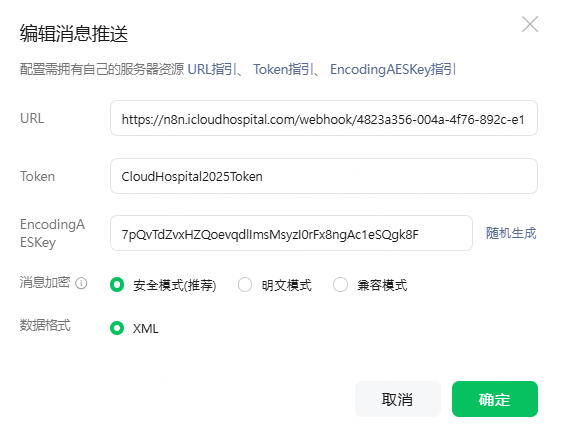
- In the 编辑消息推送 (Edit Message Push) modal, copy and enter the following Webhook URL: e.g. https://n8n.icloudhospital.com/webhook/xxxxx/wechat
- Enter the following values:
- URL(服务器地址): Paste the webhook URL above
- Token(令牌): Enter the same Token you provided in Step 2
- EncodingAESKey(消息加密密钥): Enter the same EncodingAESKey you provided in Step 2
- 消息加密方式: Select 安全模式(推荐) (Secure Mode - Recommended)
- 数据格式: Select XML
- Click 提交 (Submit)
- WeChat will automatically verify your webhook URL
- Once verified, click 启用 (Enable) to activate
Note: The above steps are sufficient for messaging functionality. If you plan to use web features (sharing web pages, payments, JS-SDK), you may need to configure 业务域名 (Business Domain) in 功能设置 (Feature Settings).